
After the Acquisition: A Phased Plan to Unify Product Catalogs
The deal closes, the press release goes out, and the integration plan covers finance, HR and IT. Then customers and distributors start asking a simple question: what do you actually sell now?
Two manufacturers rarely structure product data the same way. Their categories differ, their part numbers collide, and the same attribute is called three different things. Until the catalogs are unified, cross-selling stalls, distributors get conflicting feeds, and the combined company can't present one face to the market.
Here's a phased plan for getting from two catalogs to one, without breaking the channels that pay the bills while you do it.
The plan at a glance
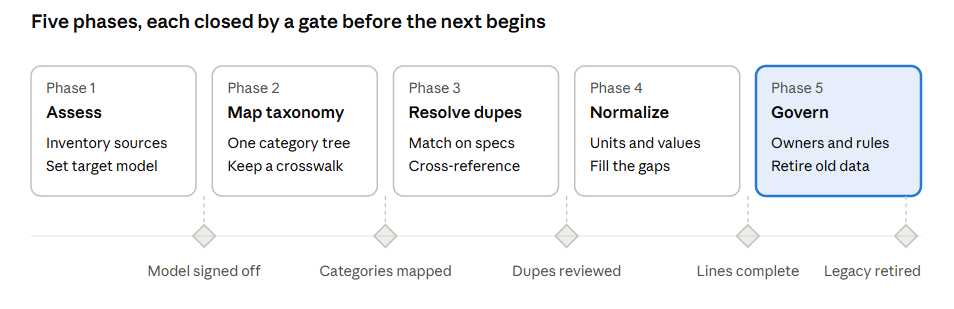
Each phase ends at a gate. Don't start the next phase on a product line until it has passed the gate before it.
Phase 1: Assess both catalogs
You can't merge what you haven't measured. Before anyone touches a record, build a clear picture of what each company brings:
- Inventory the sources. ERP, PLM, PIM, e-commerce, distributor feeds and the spreadsheets nobody mentions in the kickoff.
- Profile the data. Count SKUs by category, and measure how complete and consistent the attributes are on each side.
- Map the channels. List which distributors, marketplaces and dealers each company feeds, and which of them overlap.
- Decide the target. Pick the system and data model the combined catalog will live in, and which company's structure is the starting point.
Gate: a signed-off target model and a prioritized list of product lines to merge first.
Phase 2: Map the taxonomies
One company files a part under "Fluid Handling > Valves > Ball Valves." The other calls it "Flow Control > Shutoff." Until those trees agree, nothing else lines up.
- Build one target taxonomy. Use the stronger of the two as a base, ensuring it follows best practices for organizing principles, specificity, label rules, etc. Not sure what any of that means? Reach out to learn about our taxonomy training!
- Map every source category. Each legacy category points to exactly one target category. Flag the ones that split or merge. If they split, determine the attribute that governs the split (e.g. motor type).
- Attach attribute templates. Each target category defines which attributes are required, so the next two phases know what "complete" means.
- Keep a crosswalk. Store the old-to-new mapping so legacy feeds, reports and URLs can still be traced. Most importantly, this lets you know how to route the SKUs to the new taxonomy.
Gate: every source category mapped, with sign-off from product management on both sides.
Phase 3: Resolve duplicates and cross-references
Acquisitions often bring overlapping product lines. Two part numbers may describe the same item, or one part number may mean different things in each company's system.
- Match on specs, not names. Compare key attributes, dimensions and supplier SKU IDs to find true duplicates. Descriptions alone will mislead you.
- Decide survivor records. For each duplicate, pick the part number that lives on and merge the best data from both into it.
- Resolve collisions. Where the same number means two different parts, renumber one side before it reaches a shared system.
- Publish cross-references. Distributors, dealers and service techs need old-to-new part mappings and supersessions, or they'll keep ordering numbers that no longer exist.
Gate: a reviewed duplicate list and a cross-reference table ready to share with channels.
Phase 4: Normalize attribute values
Even with one taxonomy, the values inside it still disagree. One side says "Max Pressure (PSI)," the other "Pressure Rating" in bar. The SKUs need to use the same unit of measure in the end, or buyers filtering on a distributor site see two catalogs pretending to be one.
- Standardize attribute names. One name and one definition per attribute, tied to the target category templates.
- Convert units. Pick a base unit per attribute and convert everything to it, keeping both systems where channels require them.
- Use controlled values. Replace free text with allowed lists, so "SS," "Stainless" and "304 SS" become one value.
- Fill the gaps. Enrich missing attributes from spec sheets, drawings and engineering, starting with the fields your top channels require.
- Align descriptions and media. Rewrite titles and descriptions to one style, and bring images to one standard.
Gate: priority product lines meet the completeness bar for their category, checked before they're syndicated.
Phase 5: Put governance in place
A unified catalog drifts apart again unless someone owns it. Governance is what makes the first four phases stick.
- Name data owners. Assign who owns each category and each part of the record: engineering for specs, product management for descriptions, compliance for certifications.
- Build the rules into the system. Required fields, validation and approval workflows in the PIM, not in a policy document.
- Route new products through one process. Both legacy teams launch through the same workflow, into the same model.
- Retire the old sources. Shut down legacy catalogs and feeds once their data has moved, so nobody updates the wrong copy.
- Measure it. Track completeness, duplicate rates and channel rejections, and review them regularly.
Gate: legacy catalogs retired, and every new product created in the unified model.
One catalog, one company
Customers judge an acquisition by whether they can find and buy the combined company's products easily. A phased approach lets you show progress product line by product line, while the channels that drive revenue keep running.
At Convergence Data, we help industrial manufacturers unify catalogs after acquisitions: taxonomy mapping, duplicate resolution, attribute normalization and the PIM governance to keep it all together. If you're staring at two catalogs that need to become one, let's talk.